
How to Clean with The CoBuilders
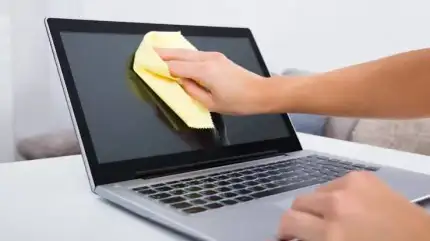
Fingerprints, dust, and smudges can make a laptop screen distracting to use. A quick wipe can help, but the cloth and cleaning method matter.
To clean a laptop screen, turn off the laptop, unplug it, and gently wipe the display with a clean microfiber cloth. For stubborn marks, follow your laptop manufacturer’s instructions before adding water or a cleaning solution.
Screen coatings vary, so a product suitable for one laptop may not be appropriate for another.
What You’ll Need
Keep your supplies simple:
- A clean, soft microfiber cloth intended for electronic displays
- A second dry cloth, if needed
- Water or a screen-cleaning product permitted by the laptop manufacturer
Use a cloth reserved for electronics. A cloth previously used on kitchen counters may carry grease, grit, or cleaner residue.
1. Turn Off and Unplug the Laptop
Shut down the laptop and disconnect its charger and accessories. A dark screen also makes dust and fingerprints easier to see.
Set the laptop on a stable surface where you can clean without tipping it or pressing against the display.
2. Gently Remove Surface Dust
Use the dry microfiber cloth to wipe the screen lightly. Move across the display in slow, overlapping passes.
Avoid pressing harder on stubborn spots. Check that the cloth is clean before continuing, and switch to a fresh section when needed.
3. Treat Fingerprints and Smudges
If dry wiping leaves marks, check your model’s care instructions. When water is permitted, lightly dampen the cloth rather than the screen. The cloth should not drip.
Gently wipe the affected area, keeping moisture away from the edges and openings. Apple, for example, recommends a water-dampened, soft, lint-free cloth for routine cleaning of standard MacBook displays.
4. Check for Streaks
Inspect the screen from an angle. If streaks remain, use a clean, dry section of the cloth for a light finishing pass.
Repeated streaking can indicate that the cloth contains oil or cleaning residue. Replace or wash the cloth instead of applying more product.
Allow the screen to dry completely before closing the laptop or reconnecting power.
What About Alcohol or Screen-Cleaning Sprays?
Use these only when your laptop manufacturer permits them for your display.
Apple allows a cloth moistened with 70% isopropyl alcohol for difficult smudges on standard MacBook displays. That does not establish compatibility with every laptop screen or coating. Never spray liquid directly onto the display.
Avoid choosing a cleaner solely because its label says “electronics.” Confirm that it is suitable for the specific screen.
Does a Specialty Display Need Different Care?
Touchscreens, matte displays, and specialty glass may have their own instructions.
For example, Apple publishes separate guidance for nano-texture displays. Its guidance permits an Apple Polishing Cloth or another microfiber cloth made for electronic displays, with 70% isopropyl alcohol reserved for infrequent treatment of difficult smudges.
If you are unsure which display you have, check the laptop’s model information or purchase specifications before treating stubborn marks.
Common Laptop Screen Cleaning Mistakes
Avoid:
- Spraying cleaner directly onto the screen.
- Using paper towels, abrasive pads, or dirty cloths.
- Applying household glass cleaner without manufacturer approval.
- Pressing firmly or repeatedly scrubbing one spot.
- Allowing moisture to run into the screen edges or keyboard.
Apple’s general care guidance also advises against abrasive materials, excessive wiping, and products containing bleach or hydrogen peroxide.
How Often Should You Clean a Laptop Screen?
Clean it when dust or smudges interfere with viewing. There is no need to repeatedly polish an already-clean display.
Keep fingers off the screen where possible, avoid eating over the laptop, and store your cleaning cloth somewhere clean and dry.
If a mark never changes after gentle cleaning, it may be a scratch or coating damage. Ask the manufacturer for advice rather than trying stronger chemicals.
Keep Your Workspace Comfortable With The CoBuilders
A clear screen is one part of a pleasant workspace. Dust-free shelves, clean floors, and an uncluttered desk can make the surrounding room more enjoyable to use.
For help with your home’s regular cleaning needs, explore house cleaning services with The CoBuilders. Share any instructions about electronics and personal belongings when arranging your service.
Featured Posts
How to Clean Your Home: Practical Tips | The CoBuilders
How to Clean Stainless Steel Pans: Burnt Food, Grease, and Discoloration

Cleaning Service House Cleaner in Albuquerque, NM: Fresh Homes in the High Desert

How to Keep Your House Clean With a Busy Schedule: 10 Easy Tips

Cleaning Stains: How to Tackle Common Household Spills and Marks
How to Remove Acrylic Paint from Clothes: Wet and Dried Stains

Affordable Cleaning Services Near Me: Find the Right Clean for Your Budget

10 Overlooked Places in Your Home that Professional House Cleaners Never Miss

How to Remove Hard Water Stains

How to Clean Vomit Out of Carpet
"Your satisfaction is our top priority. We don't just clean spaces; we create environments where you can thrive."
Bukola Michael Nelson
Founder & CEO, The CoBuilders